
Search Insights
DIY vs Automated Ads: Which Saves Agents More Time?
Compare DIY vs automated real estate ads to see how automation cuts setup and management time for agents.
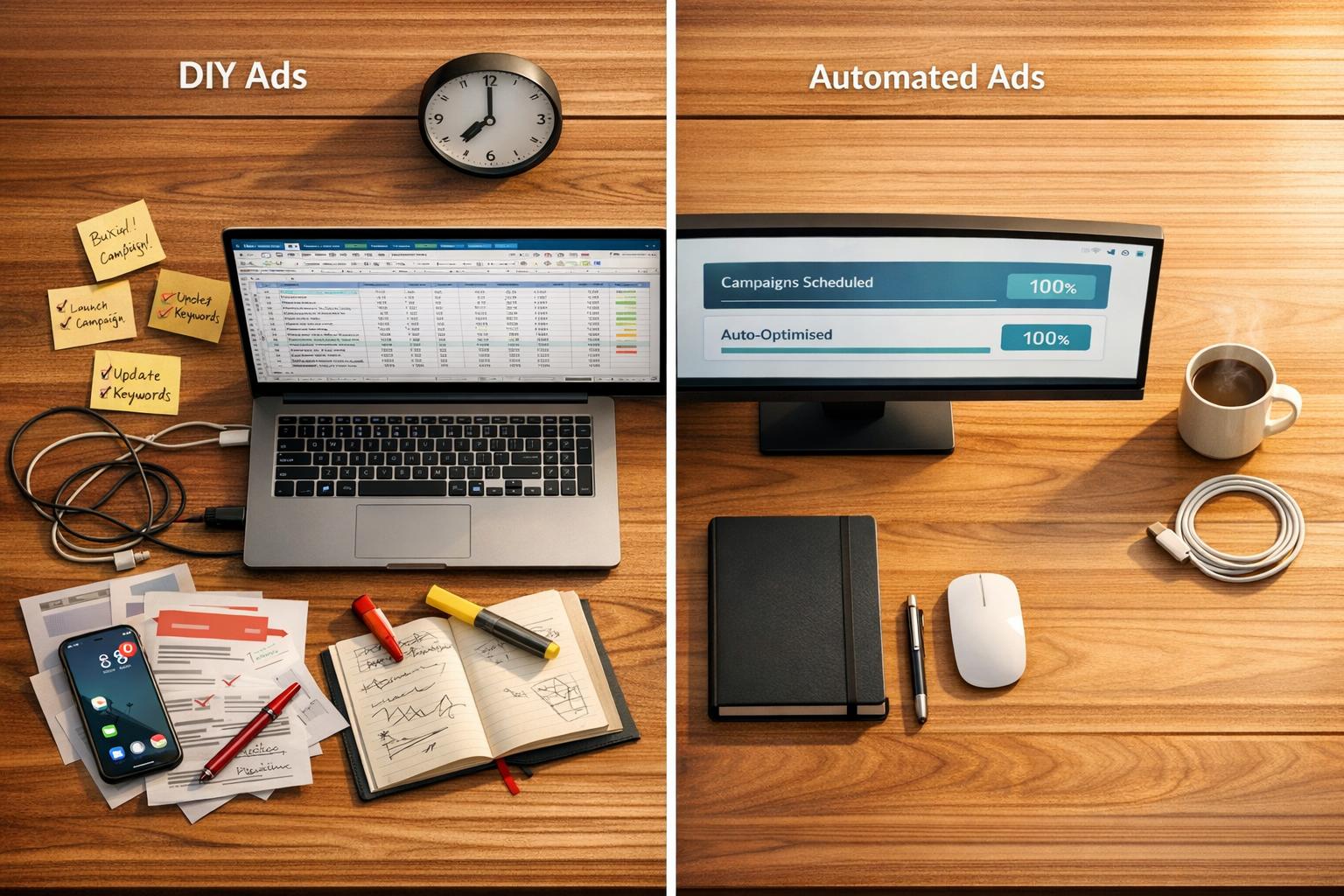
DIY ads require more time and effort, while automated platforms like Realty Rocket offer a faster, less hands-on solution.
DIY advertising gives agents full control but demands significant time for setup, audience research, creative work, and ongoing management. In contrast, automated tools handle these tasks, saving up to 20 hours per week. For busy agents juggling multiple listings, automation can be a practical choice to focus on clients and deals.
Key Takeaways:
- DIY ads: Time-intensive, requires expertise, offers full control.
- Automated ads: Quick setup, minimal effort, less control.
Quick Comparison:
| Aspect | DIY Advertising | Automated Ads (Realty Rocket) |
|---|---|---|
| Setup Time | 1–3 hours | < 5 minutes |
| Creative Work | 2–5 hours | 0 minutes |
| Campaign Launch | 1–2 hours | 0 minutes |
| Ongoing Management | 2–3 hours per week | 0 minutes |
| Monthly Reporting | 1–2 hours | 0 minutes |
DIY is ideal for agents who want full control and have the time to manage campaigns. Automated platforms are better for those seeking efficiency and simplicity without sacrificing ad performance.
DIY Advertising: Time Requirements and Process
Running DIY ads through Meta Ads Manager means you're in charge of everything - audience targeting, ad creation, and tracking conversions. But the real investment here is time. Mastering the platform takes effort, and managing campaigns can be demanding. As Elise Dopson from Shopify points out, "Opening the Meta Ads Manager for the first time can be overwhelming. You'll find multiple dashboards, ad format options, and audience insight tools".
The process is structured into three levels: Campaigns, Ad Sets, and Ads. Each requires its own setup. Real estate agents face an added challenge with the "Housing" special ad category, which limits targeting options like age, gender, or postcode. Without these filters, you'll need to include qualifying questions in your ad copy or lead forms to filter out unqualified leads. Here's a closer look at the steps involved and the time commitment required for DIY advertising.
Researching and Setting Up Target Audiences
Since the "Housing" category restricts standard demographic targeting, you'll spend time manually defining interests (e.g., home renovation or interior design) and behaviours (e.g., recent property searches or device usage). For more advanced targeting, you can create Custom Audiences from email lists or Lookalike Audiences to find users similar to your existing clients.
Another time-intensive task is setting up conditional logic in Meta Instant Forms. This feature tailors questions based on previous answers, helping you gather details like lead timelines or financing status automatically. While this upfront work is crucial, it’s only the beginning - next comes the creative process.
Creating Ad Copy, Graphics, and Media
Developing creative assets is a major time sink, but it’s also where campaigns succeed or fail. Experts suggest running 6–12 ads per ad set, mixing formats like videos, carousels, and static images. For real estate, this means sourcing professional property photos, crafting lifestyle-focused ad copy, and producing assets tailored for different platforms, such as vertical videos for Reels.
Savannah Sanchez, founder of The Social Savannah, highlights the importance of creative volume:
"I believe that having a volume of effective ad creatives is the only way to scale an ad account... It all boils down to doing weekly creative testing".
To avoid creative fatigue - a common issue in real estate ads - you’ll need to update property photos and refresh ad copy weekly. Once your creative materials are ready, the technical setup begins.
Setting Up and Managing Campaigns in Meta Ads Manager
After finalising your creative assets, you’ll move on to configuring the technical aspects. This includes installing the Meta Pixel for tracking, setting up UTM parameters for analytics, and syncing product catalogues if you’re advertising multiple listings. Once your campaign is ready, Meta’s review process can take up to 24 hours before the ads go live.
It’s recommended to let campaigns run for at least two weeks to allow Meta’s algorithm to optimise performance. During this time, you’ll monitor metrics like Click-Through Rate (CTR) and Cost Per Lead (CPL), run A/B tests on visuals and headlines, and adjust budgets manually based on performance.
Ongoing management is just as demanding. You’ll need to test new strategies, pause underperforming ads, refine successful ones, and scale campaigns accordingly. And don’t forget about lead follow-ups - since 78% of consumers abandon a business if their initial call goes unanswered, it’s essential to contact new leads within five minutes of submission. Effective follow-up often requires multiple touchpoints over the first week to maintain engagement.
Automated Advertising with Realty Rocket: How It Works
Realty Rocket simplifies the ad creation process by using just a listing URL. Designed with New Zealand agents in mind, it removes the hassle of dealing with complex technical setups. As the team says:
"If you can drag and drop a photo into a box, you are overqualified to use Realty Rocket".
Submitting Property Listings and Campaign Details
Getting started is straightforward. You provide your email, phone number, and property listing URL through an easy onboarding process. After that, you choose a package that fits your needs. The options range from the NZ$150 Spark package (which includes NZ$100 for ad spend and photo-based ads) to the NZ$850 Galaxy package (offering NZ$750 for ad spend and creative formats such as video ads and lead capture forms). You also set your campaign duration (7–28 days), customise targeting preferences, and select display options before completing payment via Stripe.
Hands-Off Campaign Management
After submitting your details, Realty Rocket takes care of the rest. It creates tailored ad copy and graphics directly from your listing URL. The platform also handles Meta account structures, permissions, and targets campaigns to specific neighbourhoods and demographics. Even better, you don’t need your own Facebook Ad account - ads run through Realty Rocket’s optimised agency account while still showcasing your branding. This hands-off system can save real estate teams 10 to 20 hours per week in their first month. It’s a streamlined way to launch campaigns quickly without adding to your workload.
24-Hour Campaign Launch
Speed is crucial in today’s fast-paced digital market. Realty Rocket aims to set up campaigns on the same day during business hours, sending them for your approval before launch. Most campaigns go live within 24 hours - or even sooner. By cutting down setup time dramatically, this automation allows agents to focus on what matters most: building client relationships and closing deals.
Time Comparison: DIY vs Automated Ads
Looking at the time commitment for DIY ads versus Realty Rocket’s automation shows just how much time agents can save to focus on their clients. Managing campaigns manually through Meta Ads Manager takes a fair bit of effort. Setting up an account, researching your audience, and dealing with permissions alone can take anywhere from 1 to 3 hours. Then there’s the creative side - designing and producing ads - which adds another 2 to 5 hours. Finally, launching the campaign itself takes 1 to 2 hours more.
With Realty Rocket, the process is drastically simplified. The initial setup takes less than 5 minutes - all you have to do is submit your listing URL and pick a package. From there, the Realty Rocket team takes care of everything, including creative production and launching the campaign, which goes live within 24 hours. This stark contrast highlights how much simpler automated solutions can be compared to the complexities of DIY ad management.
Ongoing tasks like monitoring and reporting further underscore the time difference. For manual campaigns, you’ll need to spend 2 to 3 hours per week on bidding and performance tracking. On top of that, pulling data and compiling reports from Meta Ads Manager can add another 1 to 2 hours each month. Realty Rocket, on the other hand, automates all of this - monitoring, optimisation, and reporting - so there’s no additional time required.
Here’s a side-by-side comparison of the time involved:
| Campaign Phase | DIY Advertising (Manual) | Realty Rocket (Automated) |
|---|---|---|
| Setup & Research | 1–3 hours | < 5 minutes |
| Creative Production | 2–5 hours | 0 minutes |
| Technical Launch | 1–2 hours | 0 minutes |
| Monitoring & Optimisation | 2–3 hours per week | 0 minutes |
| Reporting | 1–2 hours monthly | 0 minutes |
For just one campaign, Realty Rocket could save you up to 10 hours during setup and another 8 to 12 hours in monthly management. If you’re managing multiple listings, those saved hours add up fast. In fact, some real estate teams have reported reclaiming between 10 to 20 hours per week in their first month using automation.
DIY Ads: Advantages and Disadvantages
DIY ads give agents complete control over their campaigns, from targeting and creative choices to budget allocation. This level of precision is especially useful when promoting properties to distinct buyer groups, like first-time buyers or luxury home seekers. For instance, you can use "Higher Intent" forms with conditional logic to filter out less serious leads and manually disable Meta's creative enhancements to maintain the polish of high-end property photos. While this control is a major perk, it comes with its own set of challenges.
Managing DIY ads requires a deep understanding of Meta's auction system. Factors like bid amounts, action rates, and relevance scores directly influence ad costs. Adding to the complexity, creative fatigue means you’ll need to keep a close eye on underperforming ads and replace them quickly. During busy periods like Q4 (October to December), competition can push costs up by 30% to 60%.
Another common challenge is choosing the wrong campaign objective. Newer agents might select "Traffic" when they’re aiming for leads or sales, which leads Meta's algorithm to prioritise clicks over actual buyers. There’s also the risk of over-targeting - narrowing your audience too much can increase auction competition and raise your cost per click.
Here’s a breakdown of the pros and cons of DIY ads:
| Advantages | Disadvantages |
|---|---|
| Full control over targeting, creative, and budgets | Time-intensive setup and ongoing management |
| Access to advanced features like conditional lead forms | Requires in-depth knowledge of Meta's auction system |
| Customisation for specific property types and offers | Creative fatigue demands constant updates and testing |
| Potential for lower costs with optimised relevance scores | Risk of costly mistakes, like poor objective selection or over-targeting |
| Retains social proof by duplicating successful ads with Post IDs | Consistent monitoring and adjustments are essential |
For agents who have both the time and expertise, DIY ads can be highly effective. However, the steep learning curve and ongoing effort can quickly become overwhelming, leaving less time for building client relationships. These challenges highlight how automated solutions like Realty Rocket can help streamline the process.
Automated Ads with Realty Rocket: Advantages and Disadvantages
Realty Rocket offers a streamlined way for real estate agents to manage Facebook and Instagram ad campaigns, saving valuable time and effort. Instead of wrestling with the technical side of Meta Ads Manager, agents can simply provide a property listing link, and the platform handles everything - from ad copy and design to targeting and campaign setup. Campaigns are typically ready to launch within 24 hours, making it a fast solution in an industry where timing is critical. After all, 96% of property buyers start their search online, so speed and efficiency are key.
The platform is also refreshingly straightforward when it comes to pricing. Packages range from NZ$150 (Spark) to NZ$850 (Galaxy), and all include ad spend. There are no hidden fees, monthly retainers, or percentage-based charges. Realty Rocket even takes care of permissions and creative elements, leaving agents free to focus on their clients and closing deals.
However, automation isn’t without its drawbacks. Campaigns require final approval from agents before launch, so any delay in providing feedback could push back the timeline. Additionally, while social platforms like Facebook and Instagram are great for generating interest, they don’t capture high-intent buyers in the same way Google Ads might. For agents who prefer hands-on control, such as fine-tuning targeting or bidding strategies, the automated approach may feel restrictive.
Here’s a quick summary of Realty Rocket’s pros and cons:
| Advantages | Disadvantages |
|---|---|
| Campaign setup takes minutes, not hours | Campaign launch depends on agent’s approval of ad creatives |
| No technical expertise in Meta Ads Manager needed | Same-day setup is limited to standard business hours |
| Professional ad copy and graphics included | Fixed NZ$100 service fee applies |
| Campaigns launch within 24 hours | Focused solely on social platforms, not search ads |
| Transparent pricing with ad spend included | Limited control over targeting and bidding strategies |
| Hands-off management with performance reports | May not appeal to agents who prefer manual adjustments |
For agents juggling multiple listings and tight schedules, Realty Rocket can be a game-changer. It eliminates the hours spent researching audiences, creating ad designs, and troubleshooting campaigns. While it offers less control over the finer details, the time saved often makes this trade-off worthwhile.
How to Choose Between DIY and Automation
Choosing between DIY and automation for your ad campaigns isn't just about convenience - it's a decision that can shape your efficiency and business growth. With timely ad launches being so critical in real estate, your approach depends on your workload, technical skills, and marketing goals. Here's a breakdown of when to stick with DIY and when automation might be the better option.
When to Use DIY Ads
DIY advertising works well if you're comfortable navigating Meta Ads Manager and enjoy having complete creative control. Some agents thrive on managing every detail, from audience targeting to fine-tuning ad copy, ensuring their campaigns align perfectly with their vision. It's also a budget-friendly option for agents just starting out and looking to minimise marketing expenses while building their client base.
However, DIY can become overwhelming. Research shows many agents abandon manual campaigns within 90 days as the workload piles up - think showings, contracts, and inspections. Consider whether you can realistically maintain a DIY approach during busy periods. If not, automation might offer a more practical and consistent solution.
When Automation Saves the Most Time
Automation shines for agents short on time, juggling multiple listings, or struggling with the technicalities of ad platforms. Tools like Realty Rocket simplify the process by handling everything - from ad creation to targeting and campaign launches. This allows you to focus on growing your business instead of getting bogged down in the nitty-gritty.
In fact, manual tasks prevent 63% of marketers from focusing on essential activities, while nearly 60% of automation users report reclaiming valuable time. Automated tools can reduce social media management time to just 15–30 minutes a day, compared to hours spent manually. For agents managing several listings, this efficiency ensures consistent advertising.
Consider using Realty Rocket for routine listing ads, freeing up time for personalised DIY campaigns when needed. You could also explore offering automated ad packages as a vendor-funded marketing option - helping to drive quicker sales while building your lead database.
Conclusion
The decision between managing ads yourself or using an automated system comes down to balancing your time and the ability to scale. While DIY campaigns give you full control, they require a lot of effort - everything from researching your audience and designing visuals to navigating the complexities of Meta Ads Manager. For agents handling multiple listings or balancing open homes, client meetings, and contracts, this can quickly become overwhelming.
Realty Rocket takes the technical work off your plate by crafting ad copy, creating graphics, and managing campaign setup and lead capture. With most property buyers beginning their search online and a large portion of New Zealanders active on social media platforms, acting quickly is crucial. The platform’s simple process allows you to spend less time managing ads and more time closing deals and building lasting client relationships.
FAQs
How do I know if DIY ads are worth the time for me?
DIY ads can be a smart choice if you're working with a tight budget, but they come with their own set of challenges. While they can help cut costs, creating and managing these ads demands a lot of time and effort. You'll need to handle tasks like designing, writing, and overseeing the campaigns yourself.
Before diving in, think about how much your time is worth. If you could be using that time on activities that directly generate income or grow your business, DIY ads might not be the best use of your energy. It's all about finding the right balance - consider how much time you can realistically dedicate and whether you have the skills to run the campaigns effectively.
What do I need ready before I start automated ads with Realty Rocket?
Before kicking off automated ads with Realty Rocket, make sure you’ve got everything ready to go. You’ll need your property listing details, which could be a link to the listing or key information about the property. Don’t forget the flat fee payment, which is required upfront. Once you’ve sorted these, Realty Rocket takes over and can have your campaign live within hours. Getting these essentials organised ahead of time will make the setup smooth and hassle-free.
Will automated ads still get quality leads for my listings?
Absolutely, automated ads can be a game-changer for generating quality leads for your listings. These tools are crafted to efficiently capture leads, helping you expand both your buyer and seller database while contributing to the long-term growth of your business.
One of the biggest perks? Automation simplifies time-consuming tasks like creating eye-catching graphics and launching campaigns. This means you can save valuable hours without sacrificing the quality of your leads. With these tasks handled, agents can concentrate on what truly matters - building relationships with prospects and turning leads into loyal clients.